Pushing Claude's limits to quickly ship a KDS
A KDS (Kitchen Display System) is a digital solution used in restaurants that replaces traditional paper tickets. This was a fun challenge to see how far I could go into building a functional prototype with Claude.
Category:
prototype
Updated:
Jun 29, 2026

Inés Escobar
Product Designer
A Kitchen Display System (KDS) is a digital screen system that kitchen staff can use to track, prioritize, and complete orders.
Designing one seemed like good material for a case study, because it forced me to work around a few interesting constraints:
Restaurant staff need to work fast and under significant pressure.
Users can't be looking at the screen for more than a few seconds at a time.
Interactive elements must be easy to tap with gloved hands.
But that's not all there is to it. A truly useful KDS would also need to take into account what happens outside the kitchen. This means knowing:
Who made the order and how should it be delivered?
Did they have any particular preferences for the order?
How about food allergies or intolerances?
Also, business-wise: wouldn't it be nice to know how much it takes us to complete orders? This kind of data could help the staff react promptly to delays. Eventually, having this information could even enable the restaurant to provide order completion estimates for clients upon ordering, based on real averages.
The process
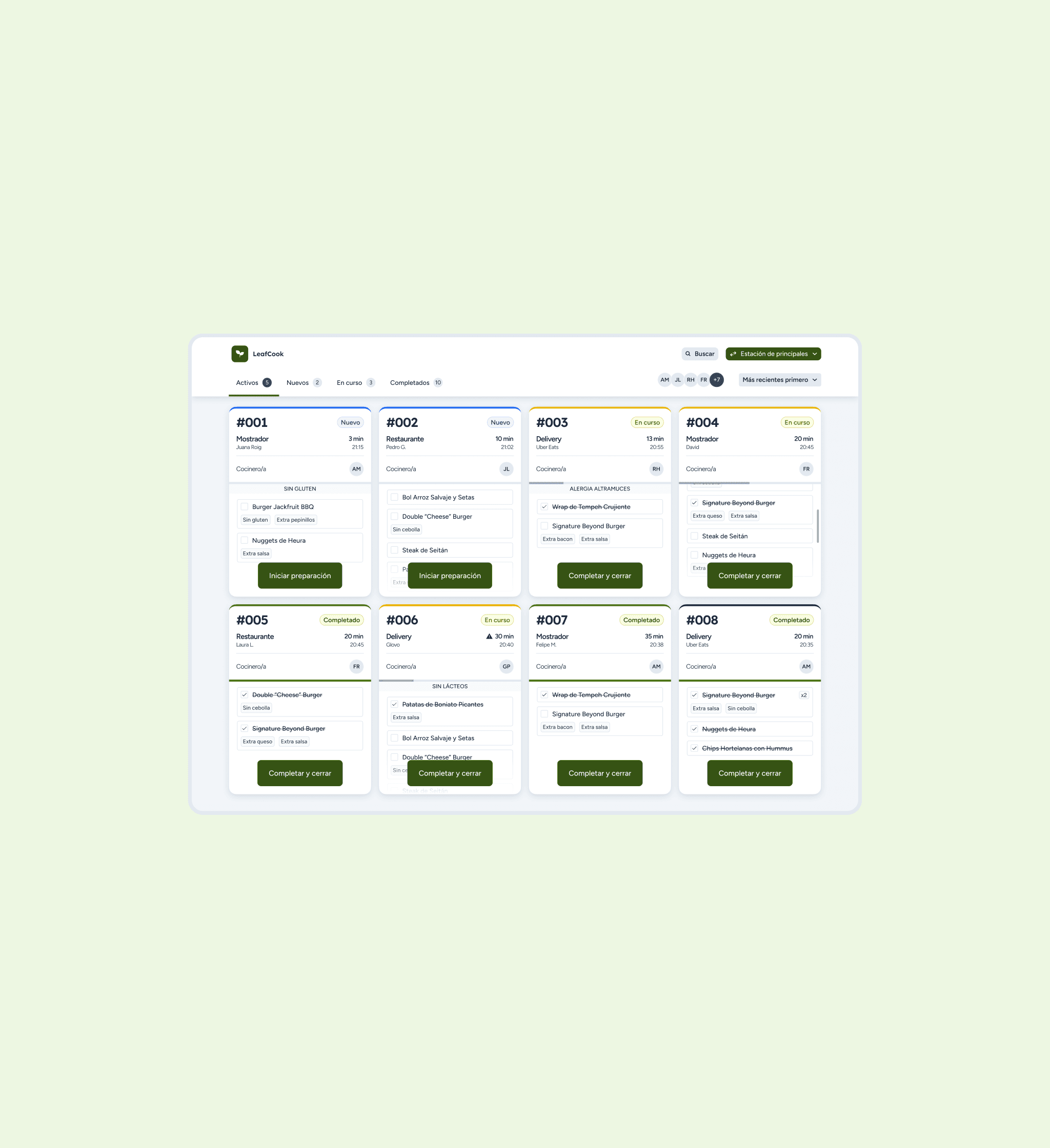
I designed in Figma first and then moved on to Claude, reviewing live builds against my specs and iteratively refining details like spacing, shadow values, and color tokens until they matched pixel-for-pixel. This let me catch usability & general QA issues early: things like a progress bar that needed to sit above the allergen banner instead of below it for visual hierarchy reasons, realizing that having multiple buttons on each ticket wouldn't be helpful in the slightest in a kitchen, or fixing unresponsive tab counts.
Consistency & logic
A big part of this project was establishing a consistent visual language: exact token values for shadows, a single source-of-truth color palette, and shared component patterns (the same checkbox, tag, and badge styles reused across every context) so the system would scale cleanly.
An interesting outcome of working with live code was being able to refine product logic progressively. There were scenarios I had not anticipated when I started designing. This would typically come up in discussion with colleagues, developers… But this was a solo project. Had I stayed in Figma, I doubt I would have noticed those edge cases.
Key implementation details
Station filtering: to reduce unnecesary noise and increase focus, cooks can filter the board to their specific station (mains, starters, drinks, desserts).
Allergen visibility: allergen warnings are a dedicated uppercase banner on each ticket.
Employee filtering: an avatar stack with initials doubles as a filter. When tapping a cook's initials, you will only see only their assigned tickets. This can be done globally, or on each ticket (a ticket may involve several stations).
Result
The result is a working, responsive prototype with accessible station and cook filtering, real-time order search, status-based color coding, and a toast notification system.
If this were a client project, I'd follow up with usability testing with real kitchen staff, before pursuing full implementation, and I wouldn't tule out integrating with competing POS software.
Curious how this really turned out? Click on the button below to test the live prototype!
